Office · Module 03 of 20
Teachers & staff
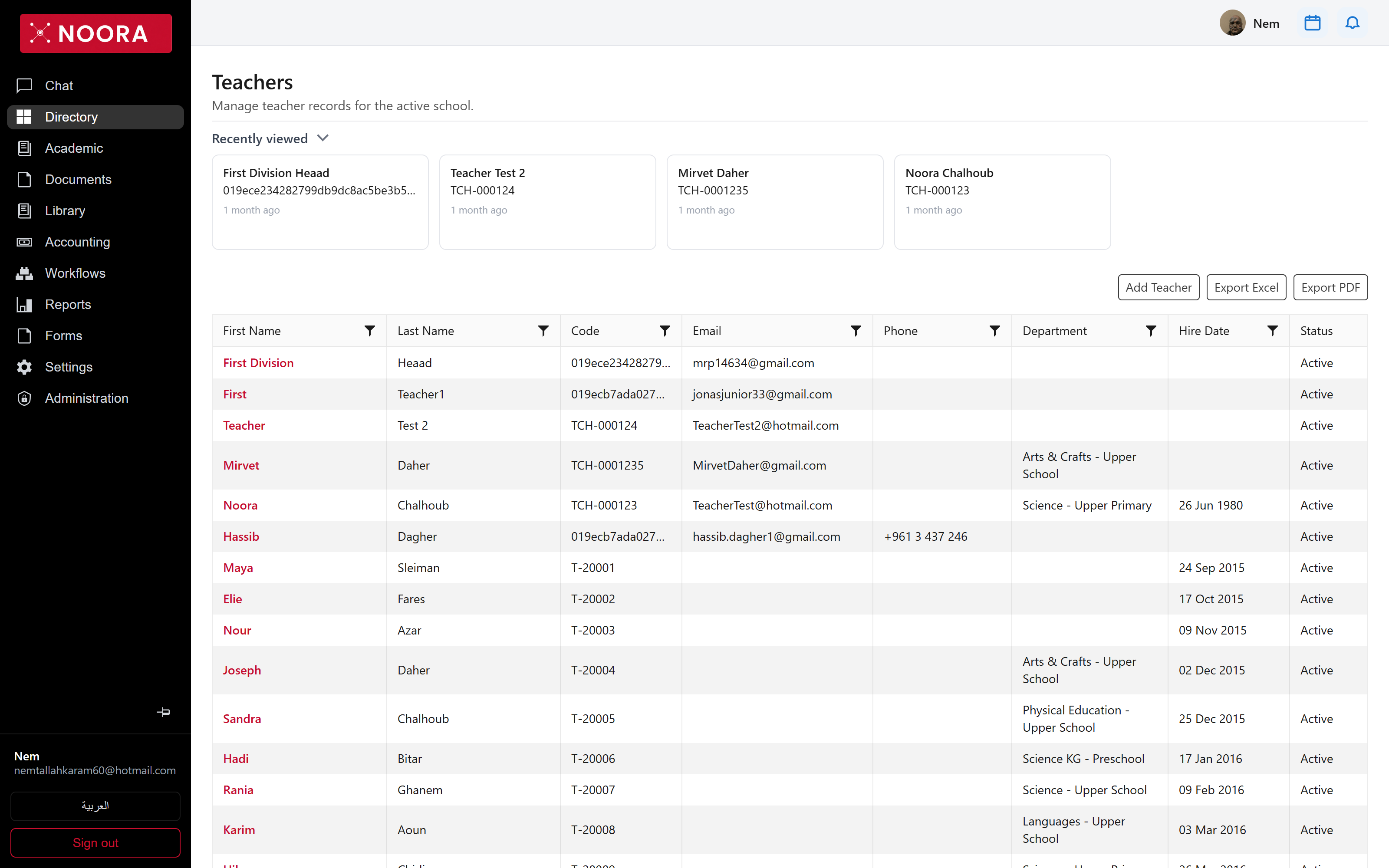
Teacher records decide who can be assigned to a course, who runs a homeroom, and who a parent is told to contact. Each one sits in a department, and departments sit under a division.
- Route
- /office/teachers
- Captured in
- Chrome
- Reaches
- Registrar, admin, division heads
What you can do here
- Add a teacher, then attach them to a department and to the courses they teach.
- Set a homeroom teacher on a class from Classes & sections.
- Filter by department to see a subject team, and export the result.
- Retire a teacher by switching status instead of deleting the history attached to them.
What's on the grid
| Column | Holds |
|---|---|
| Code | Staff code — TCH-000123, T-20001. |
| Email, Phone | Contact details. Whether families see these in the portal assistant is a school setting, not a per-teacher one. |
| Department | Subject team, scoped to a division. Set up in Academic structure. |
| Hire Date | Start date, where the school tracks it. |
| Status | Active keeps the teacher assignable. |
A person can hold more than one role
Staff, parent and student identities are separate
records but one login. A teacher who is also a parent at the school signs in once and gets both — the roles
column in Users shows combinations like Parent,DivisionHead,Admin.